Most GoHighLevel accounts I open up are expensive contact databases. The pipelines exist, the calendars exist, the workflow builder sits untouched, and the owner still answers every lead by hand. AI sales automation in GoHighLevel is not one feature you switch on. It's a stack of seven layers, wired in a specific order. Get the order right and the platform runs your follow-up while you run your business.
ATP AI builds on GoHighLevel every day. It powers our own CRM, our client receptionist deployments, and the automation behind our review and booking systems. What follows is the exact build order we use, plus an honest answer to the question every owner eventually asks me: should I do this myself or hire it out?
This is a practitioner walkthrough, not a feature tour. Every layer below is something we've configured, broken, and fixed in live accounts.

Start With the Pipeline, Not the AI
Every failed GHL automation project we've audited made the same mistake: it automated a sales process that was never defined. The AI amplified the mess.
Read that again. The AI didn't fix anything. It made the chaos faster.
Before you touch a workflow, build one pipeline per revenue motion. Stages should represent commitments the prospect made, not activities you performed. "Discovery call booked" is a stage. "Sent a follow-up" is not. If a stage doesn't tell you what the prospect agreed to, delete it.
Keep it to five to seven stages. New Lead, Contacted, Appointment Booked, Showed, Proposal Sent, Won, Lost. Every automation you build from here fires off a stage change or a tag, so a clean pipeline is the difference between a machine and a mess. I'm Tyler Fikowski, and I learned this managing humans before I ever automated anything: I was the first salesperson through the door at a startup, scaled it to nine cities, 136 internal reps and over 70 contractors across six countries, and the teams that won were the ones whose pipeline stages meant something. Software is no different.
The AI Sales Automation Stack Inside GoHighLevel
Here is the full AI sales automation stack we deploy in GoHighLevel, in build order. Each layer depends on the one before it.
- Pipelines - the source of truth for every trigger.
- Workflow automations - speed-to-lead, nurture, appointment reminders, no-show recovery.
- AI chat - conversation AI on your website widget, SMS, and social channels.
- Calendar wiring - one calendar per meeting type, connected to workflows.
- Missed-call text-back - the fastest ROI in the platform.
- AI receptionist layer - voice AI that answers, qualifies, and books.
- Review requests - automated reputation flow after the job closes.
Build them in this order. Owners who start with AI chat before the pipeline and calendars exist end up with a bot that has nothing to book into and nowhere to log the lead.
Workflow Automations That Do the Chasing
Three workflows carry most of the weight in every account we run.
Speed-to-lead. Trigger: any new inbound lead from a form, chat, or ad. Actions: instant SMS and email acknowledging the inquiry, an internal notification, and the contact dropped into the New Lead stage. Response time is the single biggest controllable variable in lead conversion, and this workflow makes it near zero at any hour.
Appointment reminders and no-show recovery. Confirmation on booking, reminder 24 hours out, reminder one hour out. If the appointment status flips to no-show, a rebooking sequence starts automatically: a same-day text with the calendar link, a next-day follow-up, then a task for a human. No-shows stop being dead leads and become a reschedule queue.
Long-term nurture. Leads that go cold get moved to a slow drip: value content every couple of weeks, not a pitch. The workflow watches for replies and link clicks, and any engagement moves the contact back into an active stage. Nobody falls through the cracks because the system does not forget.
AI Chat, Calendar Wiring, and Missed-Call Text-Back
Here's the thing about GoHighLevel's conversation AI: it's only as good as the calendar it books into and the knowledge you feed it. Wire calendars first: one calendar per meeting type, with buffers, correct time zone, and team round-robin if more than one person takes calls. Every booking should fire a workflow, which is why calendars come before chat in the build order.
Then train the AI chat on your actual business: services, service area, pricing philosophy, the ten questions your front desk answers every day. Set it to book directly into the correct calendar and hand off to a human on anything outside its lane. Test it yourself for a week with real questions before it faces customers. The goal is a qualified, booked appointment with zero human touches on the routine inquiries.
Missed-call text-back is the layer we activate first when a client needs a quick win. When a call goes unanswered, the contact instantly gets a text: "Sorry we missed you - what can we help with?" That one automation rescues the leads that used to call the next company on the list. It takes minutes to configure and it starts recovering revenue the same day.
The AI Receptionist Layer

Chat and text-back cover written channels. The phone is where most service businesses still bleed. An AI receptionist answers every call, qualifies the caller, books directly into your GHL calendars, and follows up by text afterward. Kaylee, our AI receptionist product, is built on exactly this GoHighLevel foundation: the pipelines, calendars, and workflows above are what she plugs into.
The wiring matters more than the voice. A receptionist that answers beautifully but books into a disconnected calendar creates more work, not less. Ours logs every call as a contact activity, tags the pipeline, and triggers the appointment workflows automatically. If you want the deeper breakdown of what to look for, we published a full guide to choosing the best AI receptionist for a small business, and the product details live on our AI for Customers page.
Review Requests: The Automation Everyone Skips
The last layer is the one owners forget because it fires after the money is collected. When an opportunity moves to Won or an invoice is paid, a workflow sends a review request by SMS with the direct Google review link. One polite nudge three days later if there is no click. Then it stops.
This is the cheapest marketing automation in the entire stack. Reviews compound: they lift your map ranking, which lifts inbound calls, which feed the receptionist and the pipelines you just built. Closing this loop is what turns the stack from a follow-up system into a growth system.
DIY or Hire It Out
Roughly 63% of Canadian companies now use AI in some form. And here's the part that hurts: most employees have had no formal training on it. GoHighLevel is a perfect example of why that gap exists. The platform can do everything above, and almost nobody configures it fully.
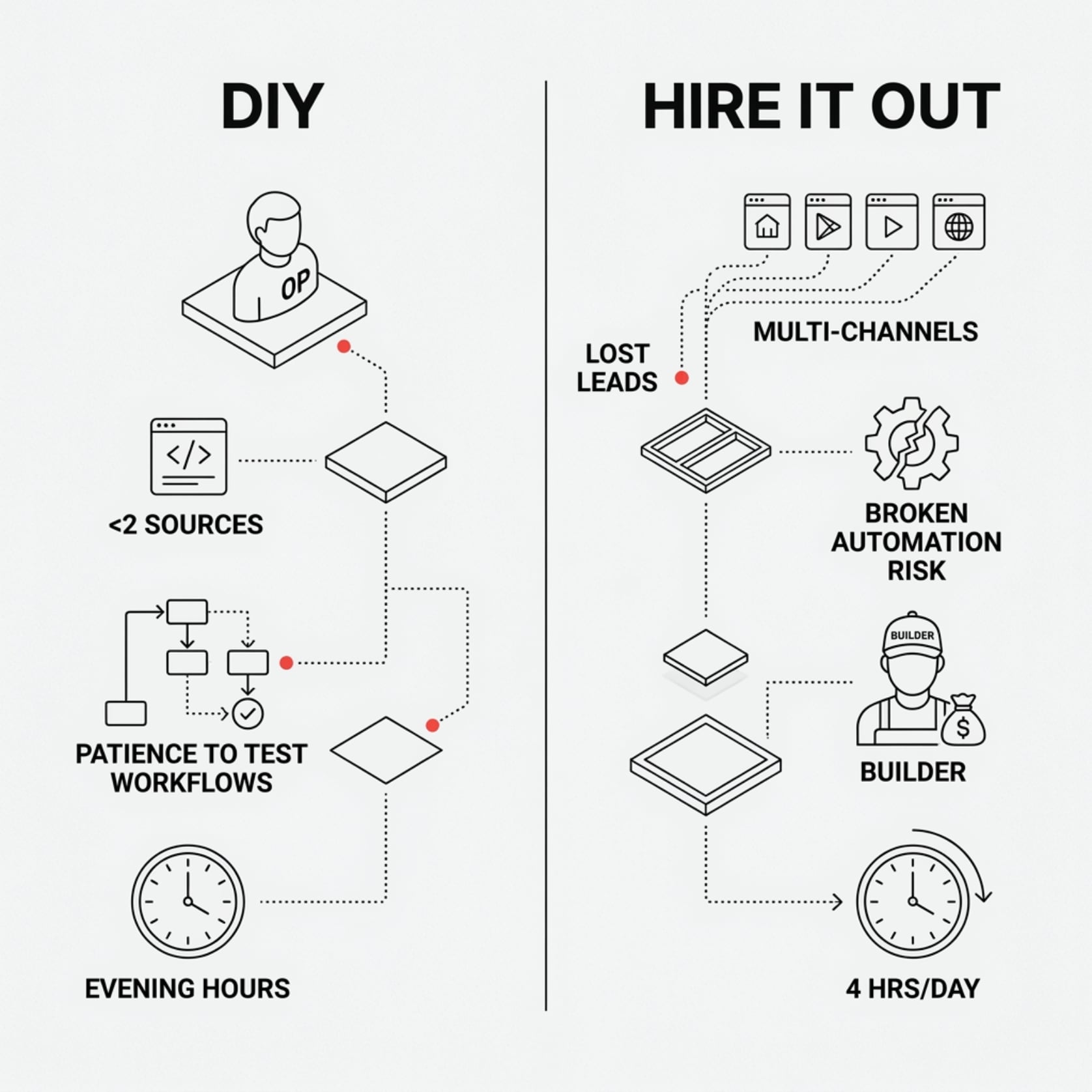
DIY makes sense if you have a technical operator in-house, fewer than two lead sources, and the patience to test every workflow before it touches a customer. Budget real evenings for it. The builder is learnable; the judgment about what to automate and in what order is the hard part, and that judgment comes from reps, not documentation.
Hire it out when leads are already slipping, when you run multiple channels, or when the cost of a broken automation facing a live customer outweighs the cost of a builder. Our benchmark for a full build is simple: the stack should hand a business owner back about four hours a day. If your sales process itself needs work before it deserves automation, that is a sales consulting conversation first, and it is worth having before you wire anything. And if you are still comparing platforms and point tools, our roundup of the best AI tools for sales teams covers what sits well alongside GHL.
Frequently Asked Questions
What should I automate first in GoHighLevel?
Missed-call text-back, then speed-to-lead. Both take under an hour combined, both recover revenue you are currently losing, and neither requires the AI layers to be configured yet.
Is GoHighLevel's built-in AI chat good enough, or do I need something else?
For routine inquiries, qualification, and booking, the native conversation AI is capable once it is trained on your business and wired to real calendars. The failures we see come from configuration, not the model. Voice is the exception: a dedicated AI receptionist layer handles phone calls better than chat alone.
How long does a full AI sales automation build take in GoHighLevel?
A disciplined build of all seven layers typically runs two to four weeks including testing. The pipeline and calendar foundation is days. The time sink is training the AI chat properly and testing every workflow path before customers hit it.
Will the AI say something wrong to my leads?
It will if you skip guardrails. Constrain the AI to your approved knowledge, set explicit handoff rules for pricing exceptions and complaints, and review its conversations weekly for the first month. Treat it like a new hire in week one: supervised, then trusted.
Can this stack run without a full-time person managing it?
Yes, that is the point. Once tested, the stack needs a weekly review of AI conversations and pipeline hygiene, roughly an hour. What it replaces is the daily hours of manual follow-up, reminders, and phone tag.
Get the Stack Built Right
We build this exact GoHighLevel stack for owners who want the machine without the learning curve, and we train teams who want to run it themselves. Either way, the first step is a conversation about your pipeline, your lead flow, and where the hours are leaking. Book a call with ATP AI and we will map your build order in one session.
Go deeper: The Automator teaches your team to run this stack without you. If you want it built for you instead, that is the Full Build.
Want more guides like this in your Google results?