
Most businesses lose customers in the gaps. The call that rings out at 6:40 pm. The web form that gets a reply two days later. The quote that never gets a follow-up. AI for customer experience exists to close those gaps: it answers every inquiry in seconds, books the appointment while interest is still hot, and follows up until a human takes over or the customer says no thanks.
Done badly, the same technology becomes a chatbot maze that traps people in loops and hides the humans. Here's the thing: customers don't hate automation. They hate slow answers, repeated questions, and dead ends. The difference between the two outcomes isn't the software. It's the design decisions behind it: which moments you automate, which moments you protect for people, and how fast the handoff happens when a conversation needs judgment.
I've watched both outcomes up close. I'm Tyler Fikowski, founder of ATP AI in Calgary. I started as an RCAF F-18 avionics technician, then ran the full sales arc: rep, leader, manager, regional manager, director. Along the way I was the first salesperson through the door at a startup, scaled it to nine cities, 136 internal reps and over 70 contractors across six countries. At that scale, customer experience is not a vibe. It's a system. Every piece of it can be inspected, measured, and improved. Here's how to build yours.

The Four Customer-Facing Surfaces Worth Automating
Customer-facing AI is not one product. It's four distinct surfaces, and each one has a specific job:
- Reception. Answering inbound calls, texts, and web chats the moment they arrive. This is where an AI receptionist earns its keep. Kaylee, ATP's AI receptionist product, answers calls, books appointments, and follows up so an inquiry never dies in voicemail. If you're comparing tools in this category, start with our guide to the best AI receptionist for a small business.
- Booking. Moving an interested person from "I have a question" to "I have a time on your calendar" without a human playing phone tag. Real-time calendar sync, confirmations, and reminders live here.
- Follow-up. The quote sent Tuesday that nobody chased Thursday. Structured follow-up sequences keep every open conversation moving until it resolves one way or the other.
- Review requests. Asking happy customers for a review the moment the job wraps, when goodwill is highest. This is the most neglected surface and the cheapest reputation engine you'll ever run.
These four surfaces work best when they share one nervous system. Our AI for Customers build runs all of them on a GoHighLevel backbone, so every call, text, booking, and review request lands in one pipeline you can actually see.
Everything in one place.
Fragmented point tools create the exact blind spots you're trying to eliminate.
AI for Customer Experience: Where Automation Delights and Where It Annoys
The dividing line is simple. Automation delights when it removes waiting. It annoys when it removes access.
Read that again.
Automation delights customers when it handles:
- Instant response. A real answer in seconds, at 2 pm or 2 am. Speed is the single biggest experience upgrade you can buy.
- Booking and rescheduling. Nobody wants to call to move an appointment. Let them do it by text in fifteen seconds.
- Confirmations and reminders. These cut no-shows and make your business feel organized before anyone meets you.
- Predictable questions. Hours, pricing structure, service area, what to prepare. Answering these instantly is a favour to everyone.
- Status updates. "Your technician is 20 minutes out" beats silence every time.
Automation annoys customers when it:
- Pretends to be human. People forgive a clearly labelled assistant. They don't forgive being tricked.
- Traps people in loops. If the third message is a rephrase of the first, the system has failed and should hand off.
- Blocks the exit. Hiding the path to a human is the fastest way to turn a mild question into a public complaint.
- Handles anger with scripts. Complaints, refunds, and disputes are human territory. Full stop.
- Over-messages. Follow-up is a cadence, not a barrage. Every sequence needs a stop condition.
If you're weighing which support tasks to hand to a machine first, my breakdown of the best AI for customer service in a small business goes deeper on the tool side. The principle stays the same regardless of the tool: automate the wait, never the relationship.
The Escalate-to-Human Rule
Every customer-facing AI system I build ships with one non-negotiable rule: the AI handles the predictable, and it escalates the emotional. Not eventually. Immediately.
In practice, that means the system hands the conversation to a person the moment it detects any of these:
- Frustration, anger, or repeated rephrasing of the same question
- Complaint, refund, cancellation, or dispute language
- A high-value or unusual request outside the defined playbook
- An explicit ask: "Can I talk to a person?"
Two details make or break the handoff. First, the escalation must carry context: the human picks up with the full transcript, not a cold start that forces the customer to repeat everything. Second, someone must own the escalation queue. An escalation that sits unanswered for four hours is worse than no AI at all, because you promised responsiveness and then broke the promise.
Get this rule right and something counterintuitive happens: customers rate the experience higher than an all-human operation. They get instant answers on the easy stuff and a faster, better-briefed human on the hard stuff.
That's the whole design.
A Realistic Rollout Sequence
Don't turn everything on at once. A staged rollout lets you catch the awkward edges while the stakes are low. Here's the sequence I run:
- Audit the gaps. Count missed calls for two weeks. Measure the time from web inquiry to first response. Check how many closed jobs got a review request. You can't fix what you haven't measured, and this baseline is how you'll prove the system works later.
- Automate reception first. Start with missed-call text-back and after-hours answering. This is the highest-leverage, lowest-risk surface: every conversation it catches is one you were losing outright.
- Add booking and reminders. Once the AI answers reliably, let it book directly into your calendar and run confirmation and reminder sequences. Watch no-shows drop.
- Layer in follow-up and review requests. Now automate the middle of the pipeline: quote follow-ups with a clear stop condition, and a review ask triggered when a job closes.
- Tune weekly. Read the escalation log and the transcripts. Every conversation the AI fumbled is a free lesson. Tighten the playbook, adjust the escalation triggers, and expand scope only when the current scope is clean.
One more step most owners skip: train the team on day one. Roughly 63% of Canadian companies now use AI, yet most employees have had no formal training on it. And here's the part that hurts: an AI receptionist your staff resents or ignores will fail no matter how good the configuration is. The humans need to know what the AI does, what it hands them, and why the escalation queue is now the most important inbox in the building.
What It Does to Response Times and Booked Calls
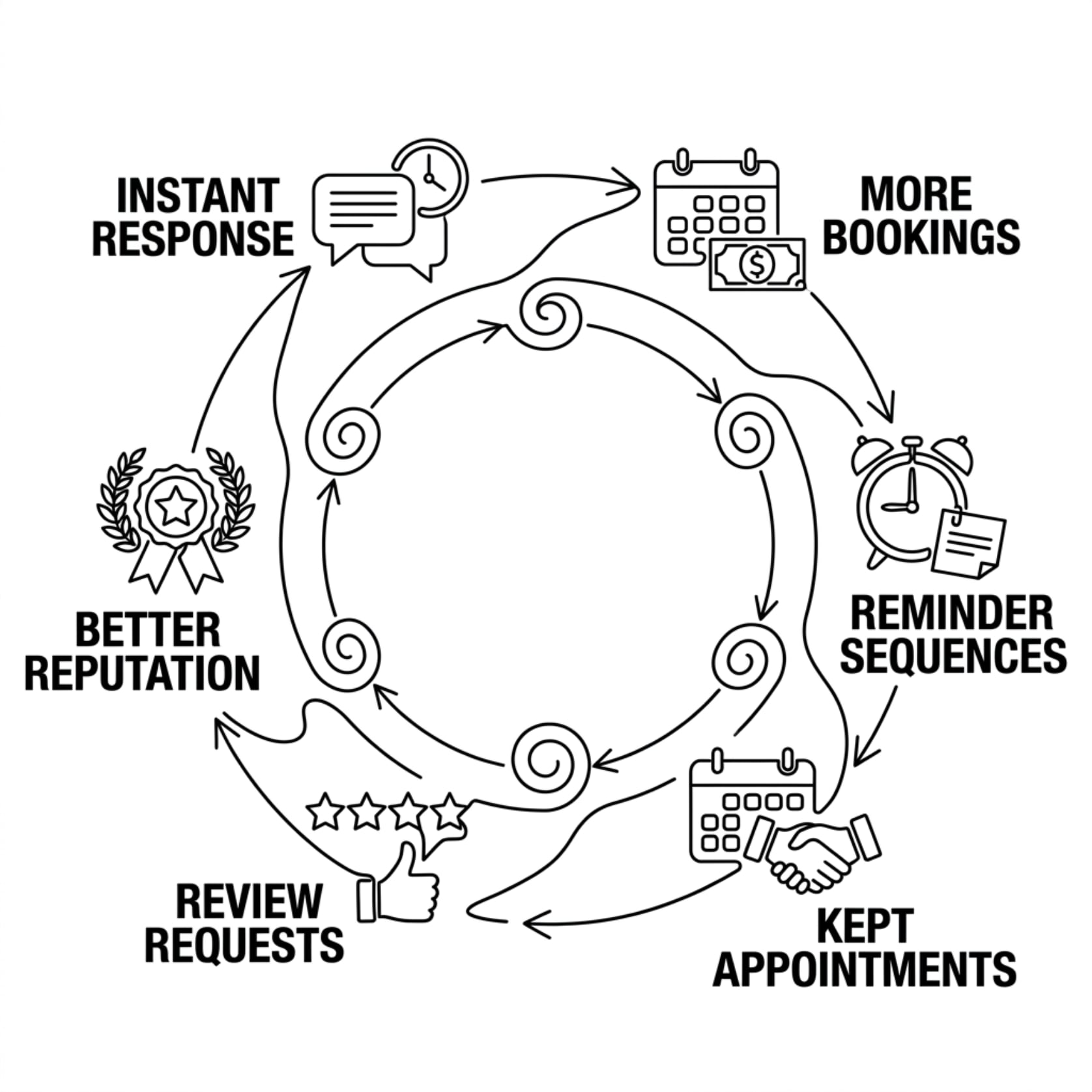
The mechanics here aren't mysterious. First response time collapses from hours to seconds, because the system answers the moment contact happens instead of when someone gets free. After-hours inquiries, which used to convert at whatever rate voicemail converts at, now get answered, qualified, and booked in the same conversation.
Booked calls rise for a structural reason: speed to lead. The business that responds first usually wins the conversation, and an always-on system responds first by default. Add reminder sequences and the appointments that get booked actually get kept. Add automated review requests and your reputation compounds while you sleep.
The owner's side of the ledger matters too. My brand promise at ATP AI is to save business owners about 4 hours a day with AI, and customer-facing automation carries a heavy share of that: the phone answering, the scheduling ping-pong, and the follow-up chasing all come off a human's plate. What stays on the plate is the work that actually needed a human: judgment calls, relationships, and the escalations that deserve full attention.
Frequently Asked Questions
What is AI for customer experience?
It is the use of AI systems on the surfaces where customers actually touch your business: answering calls and messages, booking appointments, sending follow-ups, and requesting reviews. The goal is instant response and consistent follow-through, with humans handling every conversation that needs judgment or empathy.
Will customers be annoyed talking to an AI?
Not if the system is honest and fast. Customers care about getting an answer and a booking, not about who typed it. Annoyance comes from AI that pretends to be human, loops on failed answers, or blocks access to a person. Label the assistant clearly and keep the exit to a human one message away.
What should never be automated?
Complaints, refunds, disputes, and anything emotionally loaded. The AI's job on those conversations is to recognize them fast and route them to a person with full context. It should also never handle high-value negotiations or unusual requests outside its defined playbook.
Do I need to replace my existing systems to start?
Usually not. Customer-facing AI layers onto your existing phone number, calendar, and website. ATP's builds run on a GoHighLevel backbone that consolidates calls, texts, chats, bookings, and reviews into one pipeline, which typically replaces scattered point tools rather than your core operations.
How do I know if it is working?
Track four numbers against your pre-launch baseline: missed calls, time to first response, booked appointments per week, and reviews per month. Read the escalation log weekly. If the first four numbers improve and the escalations are being answered quickly, the system is doing its job.

Put a System on Your Front Door
Every missed call and slow reply is revenue leaking out of a gap you can close this month. ATP AI designs, builds, and installs customer-facing AI for Canadian businesses from our Calgary HQ, with the escalate-to-human rule wired in from day one. Book a call and we'll map your four surfaces, find the biggest leak, and show you exactly what to automate first.
Want more guides like this in your Google results?