The best AI for customer service in a small business isn't a single tool. It's a system that covers four channels - phone, chat, SMS, and email - and knows exactly which conversations belong to a machine and which belong to a person.
Most small businesses get this backwards. They buy a chatbot, bolt it onto the website, and wonder why nothing changed. Here's the thing: the leak was never on the website. It was the phone that rang out at 2pm on a Tuesday. The quote request that sat unanswered for two days. The lead who got one reply and never heard from anyone again.
I've watched that pattern repeat for years. This guide covers the whole fix: the four channels, the line between automate and keep-human, the follow-up leak that costs more than any missed call, the implementation order that actually works, and the numbers that tell you whether it's working. Written from Calgary. Applies to any small business in Canada.
Start With Channels, Not Tools
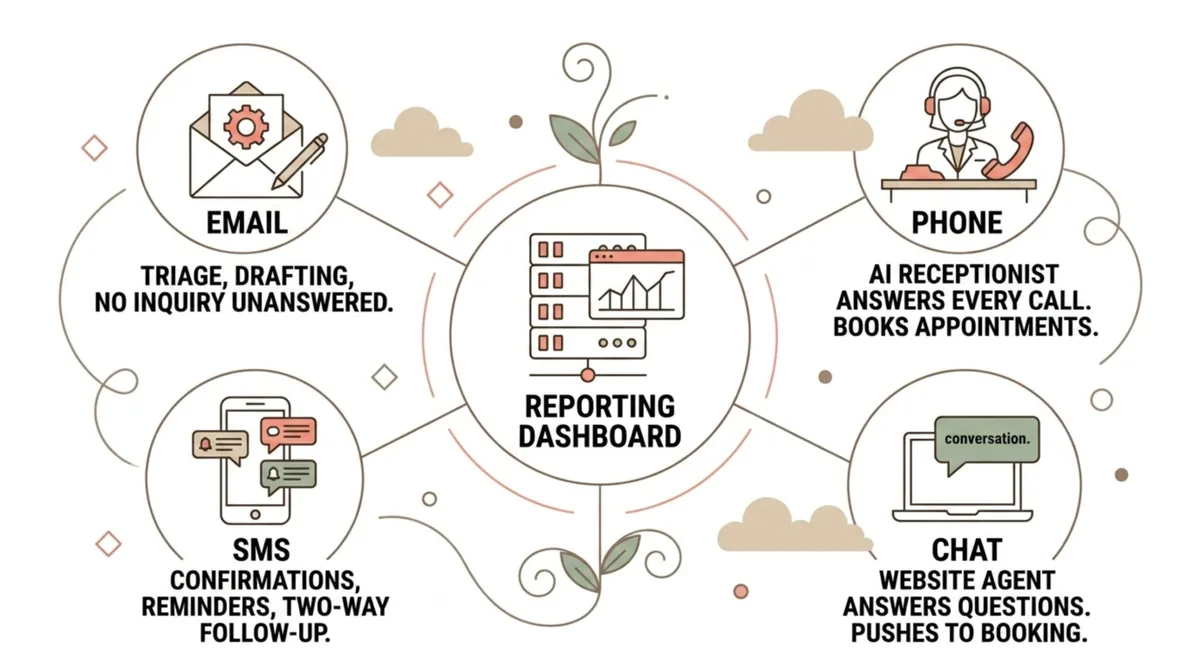
Customer service AI gets sold tool-first: a chatbot here, an autoresponder there. Wrong frame. Your customers reach you through four channels, and each one fails differently.
- Phone. Highest-intent channel, and the one most small businesses fail on. A caller has a problem right now and picked up the phone to solve it. Every ring-out during a job, a meeting, or after hours is a customer deciding whether to call your competitor. An AI receptionist that answers every call, handles the common questions, and books the appointment closes this hole completely. I broke down how to choose one in our guide to the best AI receptionist for a small business.
- Chat. The website visitor at 9pm comparing three providers. A well-built chat agent answers real questions about your services, hours, and process, then pushes toward a booked call instead of a dead-end "someone will get back to you."
- SMS. Texts get read fast and answered fast. This is the channel for confirmations, reminders, follow-ups, and quick two-way questions. It's also the channel most businesses ignore entirely.
- Email. Lower urgency, higher volume. AI earns its keep here by sorting what matters from what doesn't, drafting responses for human review, and making sure no inquiry sits unanswered past the first hour.
The best systems run all four channels off one CRM, so a conversation that starts on the phone can continue over SMS without the customer repeating themselves. Everything in one place. That's the architecture behind our AI for Customers build: one brain, four channels, every conversation logged.
What to Automate and What to Keep Human
The rule is simple. AI handles speed and consistency. Humans handle judgment and emotion. Draw the line there and hold it.

Automate:
- First response on every channel, every hour of the day
- Common questions: hours, pricing structure, service areas, process
- Appointment booking, rescheduling, and confirmations
- Reminders before appointments and follow-ups after
- Review requests after a completed job
- Routing: getting the right conversation to the right person with full context
Keep human:
- Complaints and anything where the customer is upset
- Refunds, exceptions, and judgment calls on policy
- Negotiations and custom quotes
- Your highest-value accounts, where the relationship is the product
Here's why I trust that line. I'm Tyler Fikowski. I was the first salesperson through the door at a startup, scaled it to nine cities, 136 internal reps and over 70 contractors across six countries, city by city with my father. By the fourth city I was cleaning CRM data at night because nobody owned the follow-up. The lesson: people don't fail at empathy, they fail at repetition. Nobody sends the fourth follow-up. Nobody answers the phone identically well at 8am and 8pm. Give the repetition to the machine and your people get better at the human work, not worse.
The Best AI for Customer Service Fixes Your Follow-Up Leak
Here's the leak almost every small business has and almost none can see: the second touch never happens.

A lead calls in or fills out a form. Someone responds once. The lead doesn't reply right away, so the conversation dies. Nobody's tracking it, nobody owns it, and thirty days later that lead has bought from whoever stayed in front of them. Missed calls are visible. Dropped follow-up is invisible, and it's usually the bigger number.
Read that again.
This is where AI customer service stops being a convenience and starts being a revenue system. A properly built system follows up on every open conversation until it reaches an outcome: booked, answered, or closed out. It doesn't get busy, doesn't get awkward about the third message, and doesn't forget.
Our AI receptionist, Kaylee, is built around exactly this loop: answer the call, book the appointment, then follow up until the conversation is resolved. Answering the phone is the entry point. The follow-up discipline is where the money is.
The Implementation Order That Works
Don't deploy all four channels at once. Sequence it by where the money leaks fastest.

- Phone first. Highest intent, highest cost per miss. Get every call answered before you touch anything else.
- Follow-up second. Wire automated follow-up onto every inbound conversation: missed calls, form fills, unanswered quotes. This is the step most businesses skip and the one that pays fastest.
- Chat and SMS third. Put the website agent up and open the text channel, connected to the same CRM as the phone.
- Email fourth. Triage, drafting, and no-inquiry-left-behind rules on the inbox.
- Train the team fifth. Roughly 63% of Canadian companies use AI, yet most employees have had no formal training on it. Tools without trained people become shelfware. Your staff need to know what the AI handles, when to step in, and how to work the handoff. We built AI training for staff for exactly this gap.
Each phase should be live and measured before the next one starts. If you want the full map of how these pieces connect across a business, our AI integration hub lays out the whole architecture.
How to Measure Whether It Is Working
Customer service AI is measurable or it's decoration. Track five numbers, weekly, on one page.
- Answer rate. Percentage of inbound calls that reach a live answer, human or AI. Target: effectively 100%.
- Speed to first response. Time from inquiry to first reply on every channel. Minutes, not hours.
- Booking rate. Percentage of inbound conversations that end in a booked appointment or a clear next step.
- Follow-up completion. Percentage of open conversations that reach an outcome instead of going quiet. This is the leak metric. Watch it hardest.
- Owner hours returned. Time you and your team stop spending on phones, inboxes, and chasing. Our benchmark across builds is about four hours a day back to the owner.
If a vendor can't show you these numbers from their own dashboard, keep shopping. The reporting isn't an add-on. It's how you know the system paid for itself.
Proof matters more than promises here - read real client reviews to see what these numbers look like in a real business.
Frequently Asked Questions
What is the best AI for customer service in a small business?
The best AI for customer service is a connected system, not a single app: an AI receptionist on the phone, a chat agent on the website, two-way SMS, and email triage, all running off one CRM. Businesses that buy one channel in isolation usually end up with a chatbot nobody uses and the same missed calls they started with.
Will AI customer service annoy my customers?
Badly built AI annoys customers. Well-built AI answers on the first ring, resolves the common questions immediately, and hands anything sensitive to a person with full context. What actually annoys customers is voicemail, hold music, and a form that never gets a reply. Measured against that baseline, a good AI system is a service upgrade, not a downgrade.
Can AI really answer my business phone?
Yes. Modern AI receptionists hold natural conversations, answer questions specific to your business, book appointments directly into your calendar, and send follow-up texts after the call. Our Kaylee receptionist, part of the AI for Customers system, does all three: answers, books, and follows up.
What should never be automated?
Complaints, refunds, exceptions, negotiations, and your most valuable relationships. Any conversation where the customer is upset or the answer requires judgment belongs with a person. The AI's job in those moments is to route fast and hand over context, not to handle it.
How long does it take to implement?
Phased right, the first channel - usually phone plus follow-up - goes live in weeks, not months. Full four-channel coverage with reporting is a staged build, and each phase should prove itself in the numbers before the next begins. The mistake is trying to launch everything on day one.
Do my staff need training to work alongside customer service AI?
Yes, and this is the most skipped step in Canada. Most companies using AI have given employees no formal training on it. Your team needs to know exactly what the system handles, when a handoff happens, and how to pick up a conversation with full context. An hour of confusion at the handoff undoes the speed the AI just bought you.
Put a System on Your Customer Service
Every missed call, slow reply, and dropped follow-up is revenue walking to a competitor who simply answered. The fix isn't another app. It's one connected system across phone, chat, SMS, and email, built on your CRM and measured weekly. Start this week: count last month's ring-outs, check which form fills got a second touch, and fix the worst leak first. Book a call and we will map the build for your business.
Want more guides like this in your Google results?